How NRIs Can Find Their Family's Land Records in India for Free
Context
My parents own farmland in Punjab. Like a lot of NRI (non resident Indian) families, the land is managed at arm’s length, decisions happen over phone calls, and nobody abroad really has a clear picture of what’s going on. Who’s actually farming it? Are the shares split fairly?
I started looking at this as a possible product, an app for diaspora farm owners. But before writing any code, I did the obvious thing: I tried to find my own family’s land in the official records. This post is the log of that. what I found, where I got stuck, and what any NRI can actually do today, for free.
Original Plan
The plan was simple: the data must be online somewhere, so pull it, make it readable, and put the land on a map. Punjab has digitized ~99% of its village land records (you’ll even see “WhatsApp te Jamabandi” advertised), so I assumed:
- Look up the record by owner name.
- Read off ownership, shares, who’s cultivating, and the lease.
- Show the parcel on a map.
Each of those assumptions turned out to be partly wrong, and the ways they were wrong are the useful part.
The systems (and the vocabulary)
Two free government portals matter, both at jamabandi.punjab.gov.in:
- Jamabandi — the Record of Rights (the text record: owners, shares, cultivators).
- Cadastral Map — the village field map (the “musavi” / “shajra”).
To read either, you need the revenue vocabulary, which is Persian/Urdu-derived:
- Khewat — the ownership account number. It groups co-owners and records each one’s share (fractions like 31/276). This is the “what’s my share” answer.
- Khatauni — the cultivation account: who actually farms it (a tenant/lessee shows up here).
- Khasra — the individual plot/field number, often written murabba//killa, e.g.
54//14/2/1. - Fard — a copy of the record. Mutation / intkal — a transfer/update event (a sale or inheritance).
The hierarchy reads: Khewat (who owns) → Khatauni (who farms) → Khasra (which plots).
How the portal is laid out
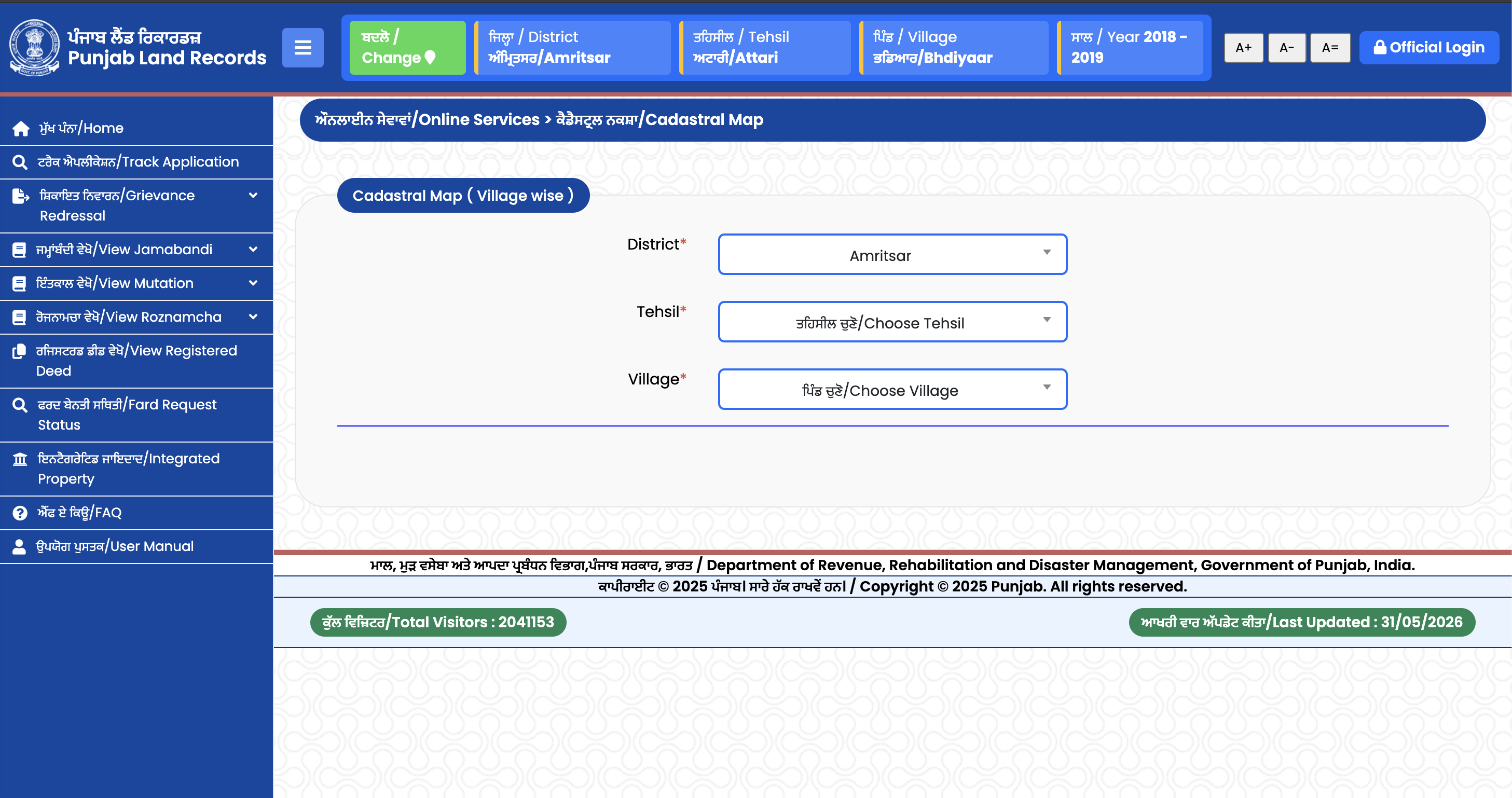
The portal has two navigation zones, used in order, and it took me a second to get it:
- The top bar is your context — District, Tehsil, Village, and Year. You set these once (via the green “Change” button) and they stay pinned on every screen. They’re the “where and when” for everything you do next.
- Once that context is set, the left sidebar becomes the menu of services you can run against it. This is where the breadth hides — it isn’t just Jamabandi:
- View Jamabandi — the Record of Rights (owners, shares, cultivator).
- View Mutation (Intkal) — the transfer history: sales and inheritance.
- View Roznamcha — the daily revenue register.
- View Registered Deed — registered sale deeds.
- Fard Request Status and Integrated Property, plus Cadastral Map, Track Application, Grievance Redressal, FAQ, and a User Manual.
The model: set the location and year up top, then pick the record type on the left. Most people open Jamabandi but View Mutation and View Registered Deed are where you’d actually catch a sale or transfer you didn’t know about. If your worry is “what’s been happening to the land,” those two are more revealing than the Jamabandi itself.
What Changed (the assumptions that broke)
1. “Search by name” barely works. The Jamabandi portal has an “Owner Name Wise” search, but names are stored in Gurmukhi and matched close to exactly. I searched my dad’s and grandfather’s names and got nothing. Why that happens, roughly in order: spelling/transliteration mismatches in Gurmukhi; the land still recorded under an ancestor because the mutation was never done; name format (“X son of Y”); a slightly different village spelling; or it’s under a co-owner/relative. “No results” almost never means “no land” — it means a lookup mismatch.
2. You really need the Khewat or Khasra number. The reliable path isn’t the name search; it’s having the khewat/khasra number or an old Fard, which the family member who manages the land almost always has. (The irony: the easiest source of that number is the very relative who’s managing it.)
3. The record is free. Every lookup has a CAPTCHA, the flow is a multi-step district → tehsil → village drill-down, and there’s no API or JSON export. It’s deliberately built for one-off human access, not bulk data.
4. The map is a scanned, hand drawn Urdu sheet, not data. When I pulled the cadastral map for my village, it was a photo of a decades-old hand-drawn map in Urdu/Persian script with Urdu numerals, split across nine sheets. So the records are in Gurmukhi and the maps are in Urdu, two non-English scripts, and “digitized” here means scanned, not georeferenced.
Iterations & Fixes (the practical how-to)
After the dead ends, here’s the sequence that actually works for an NRI today, for free:
- Get the khewat or khasra number from family or a copy of an old Fard, registry/sale deed, or property tax receipt. This is the key; don’t rely on name search.
- Confirm the exact village / tehsil / district. Ancestral village spellings vary.
- Go to
jamabandi.punjab.gov.in→ Jamabandi, drill down to the village, choose Khewat/Khasra Number Wise (or try Owner Name Wise with Gurmukhi spelling variants), solve the captcha, and view the Fard. - Read column 3 for owners + shares, column 4 for the cultivator, column 8 for mutations (transfers/sales).
- For the map: same site → Cadastral Map → village → the sheet(s). Expect a scanned Urdu musavi; cross reference your khasra number to find the plot’s grid position.
That’s the whole thing, no payment, no middleman. Note that third party apps will fetch the same free record instantly for roughly ₹90 (~$1) per document. That’s a fair price for removing the friction, but it is free at the source if you have the numbers and the patience.
What I Learned
- The data exists at every layer; it’s the access that’s broken. Ownership, shares, transfers, even the field map are all there, but locked behind captchas, two scripts, a missing identifier, and scanned images. The friction, not the data, is the real barrier.
- The identifier is the first mile. Almost everything hinges on having the khewat/khasra. Without it you’re stuck; with it, the rest opens up.
- Records ≠ reality. The Jamabandi tells you who owns and who’s recorded as cultivating, not what’s physically happening on the land.
Next Steps
If you’re an NRI just trying to understand your family’s land: get the khewat number, pull the Fard, and read the shares and mutation history and you’ll probably learn something you didn’t know.